Adopt a managed Iceberg data lake without resyncing data


Moving data into a cloud data warehouse (CDW) with Fivetran is straightforward: select from more than 750+ connectors, configure a destination, and let Fivetran handle the ongoing data movement. But adopting a data lake has traditionally required another major migration — including re-extracting historical data from source systems you’ve already ingested once into your warehouse.
That can be expensive and time-consuming, particularly for connections with years of history or sources that place limits on extraction. It can also put additional load on production systems.
Fivetran now offers a migration path that lets existing Fivetran customers adopt managed Apache Iceberg tables without performing historical source resync. This provides a more practical way to embrace Open Data Infrastructure, improve interoperability through Apache Iceberg, and potentially reduce ingestion costs.
Instead of extracting all your historical data again, Fivetran copies the data already stored in the warehouse into managed Iceberg tables and preserves the connection’s sync cursor. After migration:
- Your existing data will be accessible in your new data lake in Apache Iceberg format.
- Your data will be accessible using the same tables within the same schema from your current warehouse.
- You are able to test before re-enabling the sync.
[CTA_MODULE]
Pre-requisites
Before migrating a connection, set up 2 destinations in Fivetran:
- Create a Fivetran Managed Data Lake destination. Start by setting up a bucket in your preferred cloud storage platform and configuring it as a Fivetran Managed Data Lake destination. This is where Fivetran will store the underlying data and create and maintain the Apache Iceberg metadata, catalogs, and tables.
- Create a new Fivetran Lakehouse destination for your Cloud Data Warehouse. Next, create a new warehouse destination in Fivetran and select Lakehouse Tables as the table type. Associate this destination with the Managed Data Lake destination created in the previous step. The new destination gives your warehouse access to the Iceberg tables stored in your cloud bucket. It does not create another copy of the data in native storage. Fivetran automatically refreshes the table metadata after successful syncs so your warehouse can query the latest data.
- Snowflake setup instructions
- BigQuery coming soon
- Databricks coming soon
Note: It is important you create the new CDW destination with the same CDW credentials, database, and schema details as your existing CDW destination so the migration process works correctly. You will then have 2 destinations pointing at one CDW instance — 1 for native table ingestion and 1 for Iceberg table ingestion.
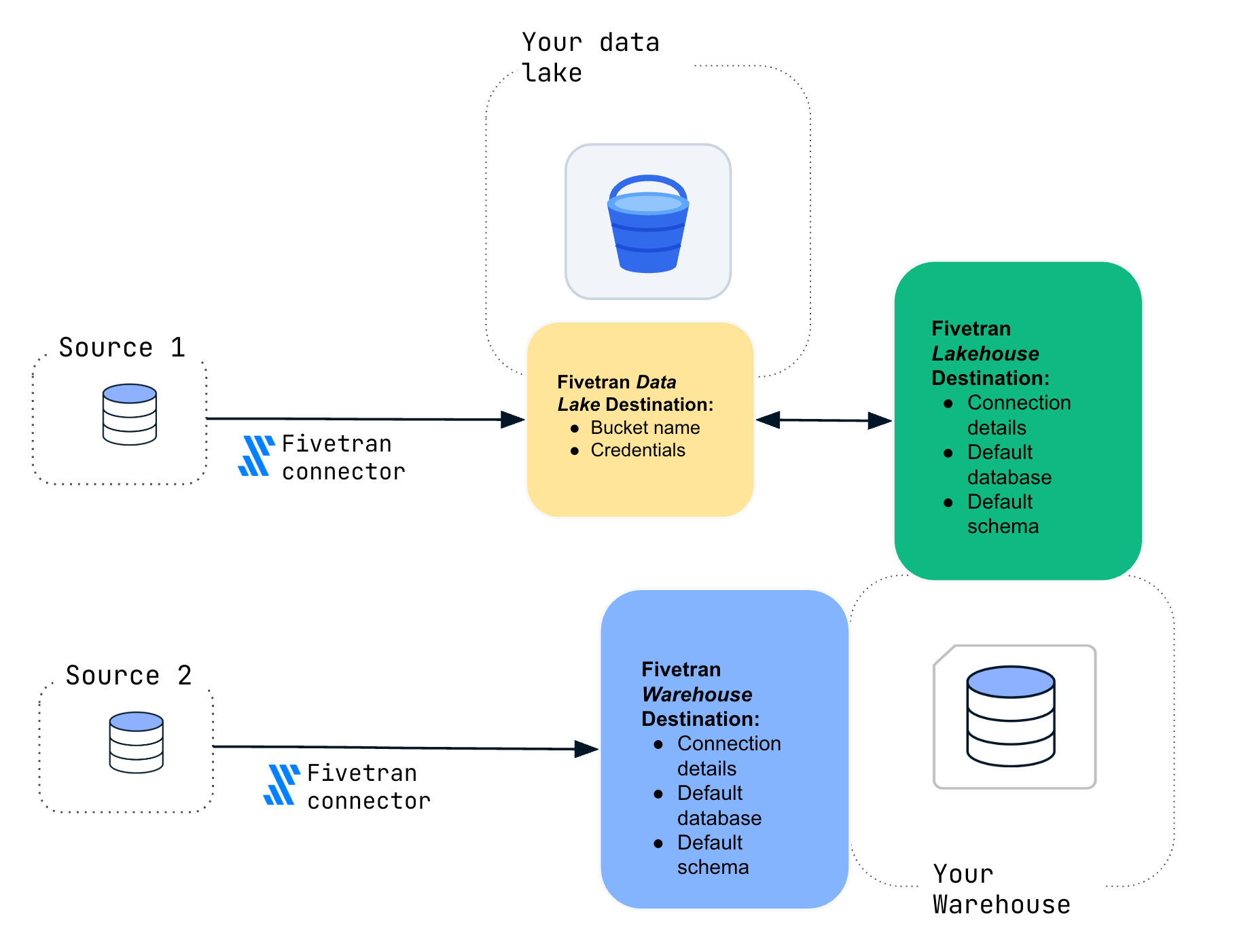
If you’re wondering why you need to create a new CDW instance when you already have one pointing at your CDW, it is to allow a migration on a per-connector basis. You can mix and match native and Iceberg tables in the same database and schema by having 2 destinations pointing at the same CDW location though. This allows you to migrate in stages or to keep some connectors writing to native tables.
Running the migration process
Once the new destinations are configured, you can migrate eligible connections from the Fivetran dashboard:
- Open the connection you want to migrate and select Convert to Iceberg Tables or Start migration.
- Choose the new Snowflake destination configured for Iceberg tables.
- Review any data-type changes that will occur during conversion.
- Enter MIGRATE to confirm and begin the process.
- Monitor the migration and review the table and row-count validation results.
- Test your downstream queries, views, models, and applications.
- Resume the connection when you are ready to continue incremental syncs.
When the migration begins, Fivetran waits for any active sync to finish and then pauses the connection. It copies the selected data into managed Iceberg tables, preserves the connection’s sync cursor, and retains the original Native tables as a backup.
The connection does not resume automatically. This gives your team an opportunity to validate the migrated tables before new data begins syncing. Once testing is complete, resume the connection to continue from its previous sync position — without extracting the historical data from the source again. (For complete instructions, see How to migrate a connection from Snowflake Native tables to Iceberg tables.)
And now that you’ve got your new lakehouse destination set up, you can move connectors without resyncing:
- Your original native tables are backed up by renaming.
- Data is automatically moved to Apache Iceberg tables with the original names, in the same database and schema so your downstream pipelines should not need to be amended.
- The Fivetran connector is moved from the native Fivetran destination to the lakehouse Fivetran destination, preserving the sync state.
- You manually re-activate the connector after performing any testing.
Watch the full process here. You can see a video of the process here
Review compatibility before migrating
Although Fivetran preserves the table names and sync state, differences between Snowflake Native tables and Apache Iceberg may require changes to downstream workloads.
For example:
- Timestamp precision may change from nanoseconds to microseconds.
- JSON, JSONB, and XML columns stored as VARIANT become STRING.
- FLOAT columns become DOUBLE.
- Iceberg tables do not support Snowflake Time Travel or partitioning.
- Connections using the Source naming convention or certain dbt transformations may not be eligible.
Fivetran displays applicable data-type changes before the migration begins and requires you to accept them. Review any dependent queries, views, models, or applications before proceeding.
Downstream transformations and models will also stop receiving new data while the migration is underway. Plan the migration for a suitable maintenance window and resume the connection only after validation is complete.
Move to Iceberg at your own pace
Organizations are adopting Apache Iceberg to gain greater control over their data, support multiple query engines, and take advantage of the economics of cloud object storage. The difficult part is often getting there without disrupting existing pipelines or reloading years of source data.
Fivetran’s migration process gives customers an incremental path forward. You can preserve connection state, continue using familiar table names, validate each workload before resuming it, and migrate connections on your own schedule.
The result is a managed Iceberg foundation that provides more flexibility without requiring your team to rebuild its data movement architecture from scratch.
[CTA_MODULE]
Apache Iceberg is a trademark of the Apache Software Foundation.
Related blog posts
Start for free
Join the thousands of companies using Fivetran to centralize and transform their data.